Sharing Tips
How to Share PSA Cards Online Without Exposing Too Much
Share PSA graded cards online while controlling cert numbers, barcodes, backgrounds, and personal details.
May 28, 2026 · 8 min read
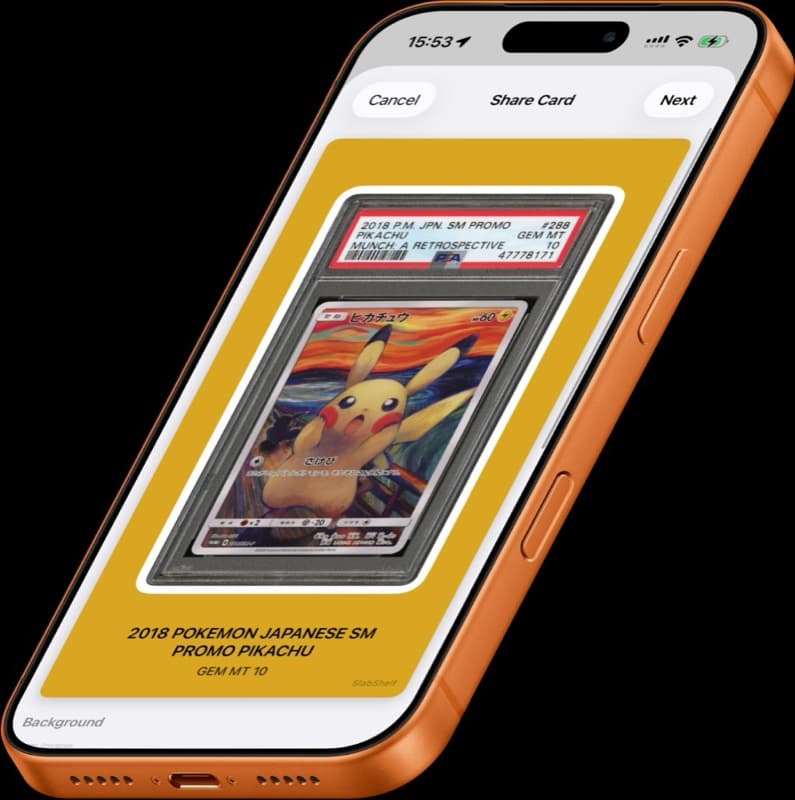
Sharing a new slab is part of the fun. The card looks good, the grade is clean, and you want other collectors to see it.
Before posting, it is worth thinking about what is visible in the image: cert number, barcode, background, and any personal information around the card.
Decide when to show the cert
If you are selling a card, showing enough information for buyer confidence may make sense. If you are only posting a collection flex, you may prefer to hide the cert number.
There is no universal rule. The point is to choose deliberately instead of posting whatever the camera captured.
Clean up the image
A good share image keeps attention on the card. Crop out clutter, avoid glare, and make sure the grade is readable if you want people to notice it.
For social posts, square, vertical, and story formats each need different spacing. A slab that looks great in your camera roll may feel cramped in Stories.
Make sharing repeatable
If you share cards often, do not rebuild the design every time. Use a repeatable format that fits your style and protects the details you want private.
Slabox can generate polished share images, choose aspect ratios, pick card-aware colors, and mask cert numbers so your posts look clean without extra editing.
Decide the goal of the post first
A sales listing, a collection showcase, a mail-day post, and a private Discord trade check do not need the same amount of information. The safest sharing habit starts by deciding what the post is supposed to accomplish.
If the goal is buyer confidence, you may need to show the cert number or provide it privately. If the goal is simply to celebrate a pickup, you can keep the image cleaner and hide extra data. If the goal is price discussion, you may need the grade, language, and set visible but not necessarily the full barcode.
What information can appear in a slab photo
A slab photo can reveal more than the card. It may show the PSA cert number, barcode, QR-style code, grade, label details, reflection of your room, shipping label fragments, desk items, or other cards in the background.
Most of that is harmless in a trusted private conversation, but public posts travel farther than expected. Images get downloaded, reposted, cropped, and indexed. Before publishing, look at the full frame, not just the card.
For high-value cards, take an extra minute. Crop the background, check reflections, and decide whether the cert should be visible.
When showing the cert makes sense
Showing the cert can be appropriate when you are selling, trading, or asking for serious valuation feedback. Buyers want to verify the card, grade, and label details. Hiding too much in a sales context can reduce trust.
Even then, you can control the flow. You might show the cert in marketplace photos, provide it in direct messages to a serious buyer, or include it only after initial interest. The right choice depends on platform norms and the value of the card.
If you do show the cert, make sure the rest of the listing is accurate. A visible cert with a mismatched title or wrong language version creates more doubt, not less.
When hiding the cert is better
Hiding the cert is usually reasonable for collection flex posts, mail-day photos, story updates, and visual galleries where verification is not the point. It keeps attention on the card and reduces unnecessary public copying of your slab metadata.
Some collectors also prefer to hide barcodes because they make a polished image feel like a listing photo. If your post is about enjoying the artwork, a masked label can look cleaner.
The goal is not paranoia. The goal is control. Publish the data that serves the post and keep the rest private.
Format images for the platform
Instagram square posts, vertical Stories, X images, Reddit galleries, Discord previews, and marketplace listings all crop differently. A slab centered for one format may feel cramped or cut off in another.
For social posts, leave breathing room around the slab and avoid tiny text that becomes unreadable after compression. For marketplace listings, prioritize clarity: full slab, readable label, sharp card image, and enough light to show condition.
Slabox can generate different aspect ratios so you are not forcing the same camera photo into every platform.
Avoid accidental personal information
The easiest privacy mistakes happen around the card, not on the card. Shipping boxes, receipts, laptop screens, mailers, and reflections can reveal names, addresses, usernames, or transaction details.
Before posting, zoom out mentally: what else is in the frame? If you took the photo at a desk, crop tighter. If the slab is on a package, move it. If a reflection shows your face or room, change the angle or lighting.
This is especially important for high-value collections. A clean share image should show the card, not your home setup.
Create a repeatable sharing workflow
A good workflow removes decisions. Scan or photograph the slab, choose a format, decide whether cert is visible, export, and post. The fewer manual edits you need, the less likely you are to forget a privacy step.
For personal collection posts, make a default rule such as hide cert, show grade, crop background, square image. For sales posts, use a different rule such as show cert, full slab, front and back, no decorative background.
Slabox supports that repeatability by letting you create polished share images, pick ratios, use card-aware colors, and mask cert numbers when you want the post to focus on the card.
FAQ
Is it unsafe to show a PSA cert number? Not always. It can be useful for sales and verification. The point is to decide intentionally rather than publish every cert by habit.
Should I hide the barcode too? If you are hiding the cert for privacy or presentation, hide the barcode as well. If the post is a sales listing, platform norms may favor showing enough information to verify.
What should a good social share image include? The card, the grade if relevant, enough margin for the platform, and no distracting personal information.
Can I use the same image for social posts and marketplace listings? You can, but it is usually better to make separate versions. Social images can be polished; marketplace images should be complete and verification-friendly.